Short on Hands? Find a Church Management System That Fits
When shopping for church management software for small churches, it’s easy to focus on two questions: What does it cost, and how much does it do? Neither answer tells you whether the system fits your church.
A low price doesn’t help if your team can’t find the hours to learn the system. A long feature list doesn’t help if most of it goes unused.
Ask instead what your small team will actually use.
In a small church, software doesn’t have to do everything. It has to do the few things no one can afford to drop.
Here’s what sets small churches apart, the benefits worth paying for, and an 8-step process with a checklist.
What Makes Small Churches Different
A larger church can give administration, finance, and technology to different people. A small church asks the same few people to cover all three.
- Recovery has been slower for small congregations. A late-2025 survey of more than 7,000 congregations found that small congregations still struggle even as others recover.
- The office runs on borrowed hours. It may be a part-time staffer, a volunteer, or the pastor after hours, with no IT person to call.
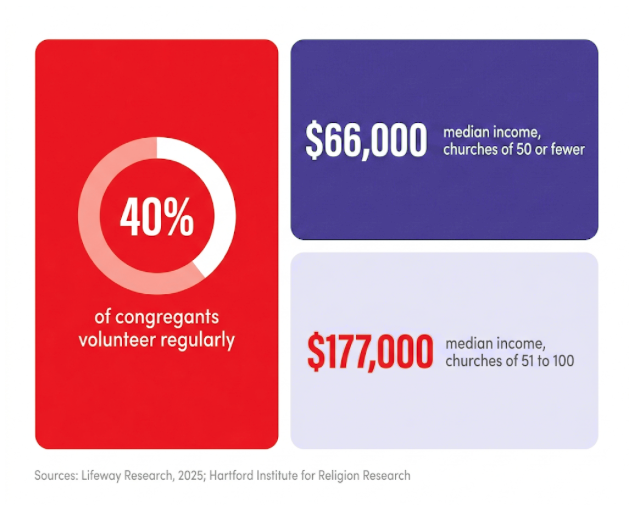
- Money has less room to flex. The median income for a church with 50 or fewer attendees is $66,000, and $177,000 for a church with 51 to 100. Protestant pastors of churches under 100 are more likely than large-church pastors to say the economy is hurting their congregation.
- Giving and budgets can be tracked by hand. Spreadsheets kept by one or two people are easy to start, but manual budgeting is time-consuming and prone to errors.
- Volunteers carry much of the load. The same survey found 40% of congregants volunteer regularly. In a small church, a volunteer may be the one entering gifts or updating records.
So when you compare systems, look for one that a few part-time people can learn quickly and your budget can carry year after year.
Benefits of Church Management Software for Small Churches
The benefits show up in everyday ministry operations.
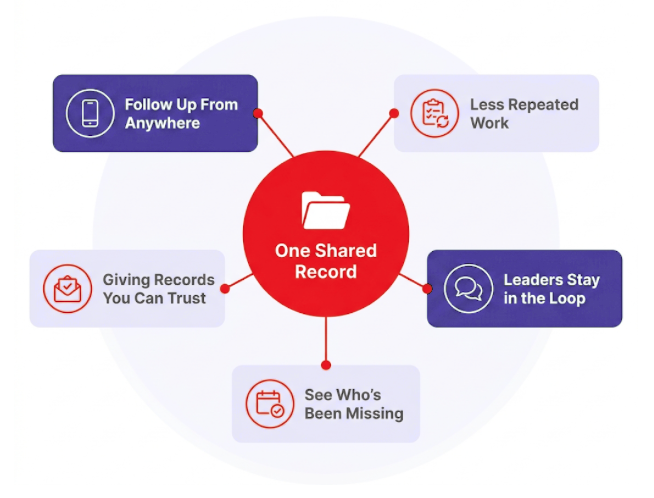
- One place for everyone’s information. Member records and pastoral care notes live in one database, a single source of truth instead of lists that don’t match. One Wisconsin congregation of about 100 people had been running several separate systems before bringing everything into one.
- Follow-up can happen from anywhere. With cloud-based church management software, a volunteer or the pastor can cover follow-up from home or on a phone.
- Fewer hours on repeated tasks. Instead of rebuilding the same follow-up list every week, tools like guided pathways for new guests keep each step in one place, so no one has to track it from memory.
- Giving records that are easier to trust. When online and recurring giving flow into the same records, year-end tax statements are less of a scramble, and keeping contributions and accounting in one system means entering each gift once.
- Leaders and volunteers can serve without calling the office. Small group leaders can check rosters and messages through communication tools and mobile apps.
- A clearer picture of who’s connected. Attendance tracking helps you notice who has been missing, even where everyone knows everyone.
Choosing a Church Management System in 8 Steps
Church software for small churches is easier to judge when every option goes through the same steps.
- Name who will run the system and who will back them up. Decide who owns it day to day and name a backup, then choose a system both can use. Your pastor may not have time to cover: 35% of U.S. clergy hold a second job, including 47% of evangelical pastors. One church of about 60 people set up volunteers and staff to handle different parts of its system to share the workload.
- List the tasks your team handles every week and every year. Weekly tasks might include guest follow-up, recording gifts, and volunteer schedules. Yearly ones include tax statements, board reports, and event registration.
- Rank those tasks by what happens if they slip. Tasks that affect people or trust go first: guest follow-up, pastoral care, and accurate giving records. Everything else can wait.
- Set a budget that includes your team’s time. Count the subscription, add-ons, online giving fees, setup, and training, plus the hours your team will spend entering data and learning, so you see technology costs on a small church budget as a whole. Free church management software and affordable church management software can work for very small churches, but ask about limits on support and users and how you’d move your data later.
- Shortlist systems built for churches your size. Narrow the list to two or three, and compare each church management platform with the same questions.
Factors to Look For in Small Church Management Software
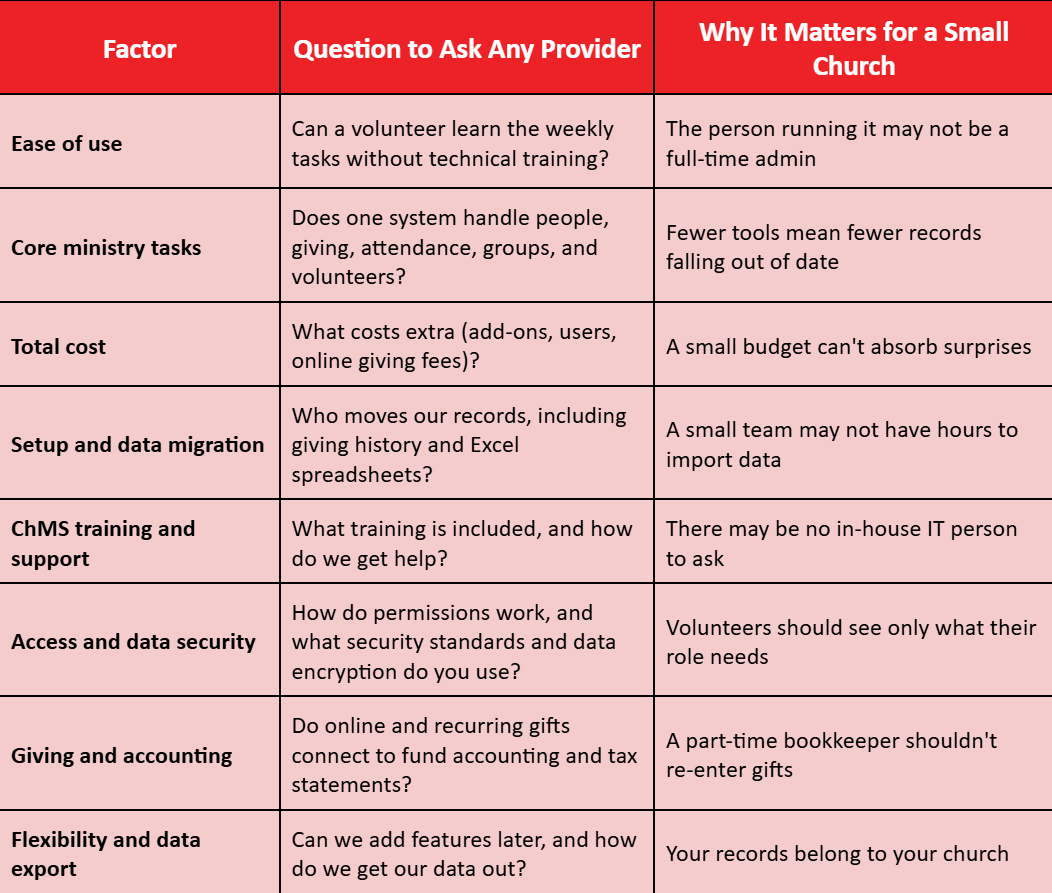
- Walk through a demo using your own weekly tasks. Ask to see your highest-ranked tasks, and bring the table questions, the person who will run the system, and their backup.
- Try the system with your own data and a volunteer. During a trial, load a sample of your own records and ask a volunteer to complete one weekly task alone. Watch where they get stuck.
- Talk to churches your size, then plan the switch. Ask each provider for references from churches with similar size and staffing. Then set a start date and training plan that fit your calendar.
How ACST Helps Small Churches Find the Right Fit

Small teams need software their volunteers can pick up quickly. ACST’s church management solutions are built for churches of all sizes, and Realm church management software is designed to be approachable, with pastors, staff, and the congregation working in one system from the screens they already use.
If only staff need access, Realm’s Inform plan covers congregation data, contributions, and reports. The Connect plan adds member connection and personal giving management, and Realm Accounting can be added to any plan. Either way, profiles, giving, groups, and volunteers sit in the same set of church management tools, so your team isn’t switching between systems.
MinistrySmart Academy courses, webinars, and one-to-one training help new volunteers learn the system, and the online Help Center is open anytime. Beyond training and support, ACST’s services include bookkeeping, IT, and consulting for teams that need more hands.
Conclusion: Efficient Church Management Starts With the Right Platform
Price and features are a starting point. The system you choose should match the time your people can give and the work your ministry does every week. What matters is that a first-time guest gets a call, a family in a hard season gets care, and every gift is recorded faithfully.
This week, sit down with whoever will manage it day-to-day and agree on the three tasks your church most needs it to handle. Bring that list to every provider, and when you’re ready, see how Realm handles those tasks in a demo.