
A family visits your church for the first time. They fill out a connection card and mention they just moved to town with two young kids. The card goes into a basket, then onto a desk, then into a stack that grows all week.
Seven days later, no one has called them. No one is quite sure whose job it was.
Most church teams care deeply about moments like this. What breaks down is usually the system around that care. Information sits on paper, in someone’s inbox, or in a spreadsheet only one person understands.
So what is church management software, and how do you know when your church needs one? This post covers what church management means, what the software does, which features to look for, and the signs your church has outgrown its current approach.
Church Management Is Ministry Before It’s Software
Church management is the everyday work that keeps a church running so people are known and cared for. It includes welcoming guests, checking in after a hospital stay, organizing small groups, scheduling volunteers, and stewarding every gift faithfully.
Much of it happens out of sight. Someone updates a record or confirms the nursery team. It rarely feels like ministry in the moment, yet it shapes what happens next.
When the administrative tasks behind church operations run well, staff and volunteers have more time and attention for the people in front of them.
That changes the question many churches start with. Instead of asking “Do we need software?” ask “Do we have a reliable way to know and care for our people?” Software is one way to answer it.
Church management software doesn’t do ministry. It keeps ministry from depending on someone’s memory.
What Is Church Management Software?
Church management software (ChMS) is a centralized database that helps a church keep track of its people and the activities that connect them, including membership, giving, groups, volunteers, events, and communication. You may also hear these tools called church management systems.
Most options today are cloud-based software, so staff and volunteers can reach the same information from the church office, at home, or on a phone.
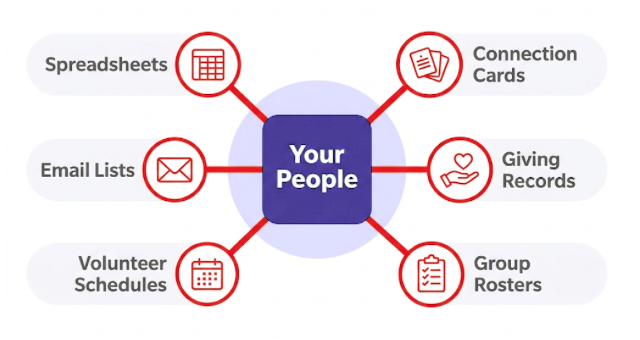
Many churches begin somewhere else. A spreadsheet holds the member list, a separate tool handles online giving, and an email platform keeps yet another copy of everyone’s contact details. The spreadsheet approach works for a while.
It starts to strain when one address change has to be made in three places, when only one person knows how the pieces fit together, or when leaders need a clear picture of the whole church community. That is when many churches start moving from spreadsheets to software.
With a shared membership database, the next person who needs the information can find it.
Core Church Management Software Features to Look For
Church management software features vary by system, and not every church needs all of them on day one. Here is what most systems cover and how each area helps your team.
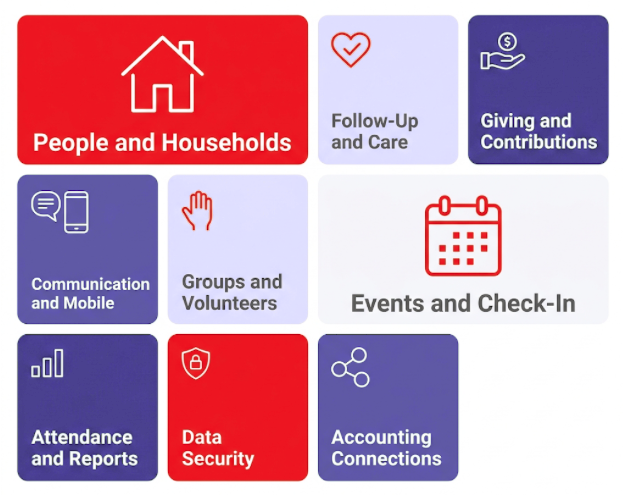
- People and household records: A member database holds contact details, family connections, and involvement history, so staff can see each person’s full story. Parishes often keep sacramental records here too.
- Follow-up and pastoral care: Staff can assign follow-up for first-time guests or members in a hard season, with reminders and automated follow-up emails, so care never depends on a sticky note.
- Giving and contribution tracking: Gifts from every channel, including recurring giving, land in one record that feeds your financial reports and year-end statements. Accurate records help you provide the written acknowledgment donors need to deduct a gift of $250 or more.
- Communication tools and mobile access: Email and text messages reach the right groups, and a mobile app or online portal lets members update their details, give, and sign up on their own.
- Small groups and volunteer management: Group leaders can stay in touch with their groups between meetings, and volunteer scheduling spreads the load so the same few people aren’t serving every week.
- Events, registration, and child check-in: Handle event registration and payments for church activities, and check children in with matching security labels and a list of authorized pickups.
- Attendance tracking and reporting: Attendance and involvement trends help leaders notice when someone starts drifting away while there is still time to reach out.
- Data security and user permissions: Role-based permissions let each staff member or volunteer see only what their role requires, which helps protect sensitive information such as giving history and care notes.
- Connections to accounting and other church systems: Contributions can flow into your church accounting and other tools, so your finance team isn’t entering the same numbers twice.
Signs Your Church Has Outgrown Its Current Approach
Outgrowing a system usually means your ministry has grown. The question is whether your tools are keeping up.
- Follow-up depends on whoever has the card or remembers the conversation.
- The same information lives in several places, and the versions don’t match.
- Contribution statements take days of manual work each year.
- Only one person can use or understand the system, and work stops when they’re out. At St. Matthew’s Lutheran Church in Renton, Washington, only one staff member could use its older desktop software at a time, so records fell behind.
- Leaders can’t easily see who has stopped attending or who is serving too often. Among Protestant churchgoers who attend once or twice a month, just 51% say someone reaches out when they miss church, compared to 73% of those who attend three or more times a month. The people drifting away are the least likely to be noticed.
- Group leaders and volunteers have to call the office for basic information.
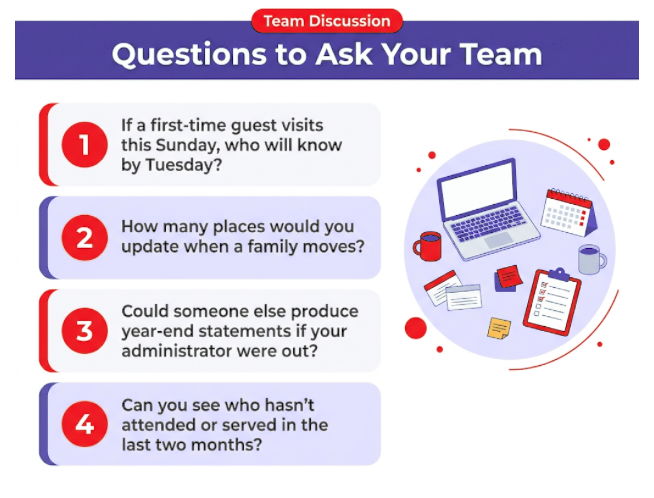
A smaller church may notice one or two of these signs, and a larger or multisite church may see several. One sign alone doesn’t mean you need to switch tomorrow.
Finding the Right Church Management Fit With ACST

Every church needs a reliable way to know its people and keep information in one place. The right system depends on how your church works and where it’s headed.
ACST’s church management solutions fit different kinds of ministries:
- Realm suits churches that want an intuitive, all-in-one system that brings pastors, staff, and the congregation together.
- MinistryPlatform suits larger or more complex ministries that need a customizable church management platform, including parishes, dioceses, and denominational offices.
- Parish Data System (PDS), founded by a Catholic priest, is designed for Catholic parishes and dioceses.
Learn more about ACST’s church management solutions and the training and support services that help teams get started. Diocesan leaders can see how ACST supports parishes at the diocesan level.
Conclusion: Build a System Your Ministry Can Grow Into
Church management starts with ministry, and church management software gives it a dependable place to keep what you know about your people. The goal is a church where a card like that family’s leads to a phone call, not a stack.
A good fit serves your church as it is today and has room for where your ministry is going next. Before you look at any system, sit down with your team and write down the three places where people most often slip through the cracks. Let that list guide every conversation that follows. Bring your team’s questions to a demo, and see how your own workflows would fit.
Frequently Asked Questions
How Long Does It Take to Set Up Church Management Software?
Setup time depends more on your data and your team than on the software. How much information moves (including giving history), how clean it is, and how much training people need all play a part. Many churches choose a gradual rollout, starting with people and giving records, and avoid busy seasons like Easter, Christmas, or year-end giving.
Is Church Management Software Only for Large Churches?
No. Churches of every size use church management software, and most churches are small. Half of U.S. churches have 70 or fewer regular worship participants. Greater Faith Grace Bible Church, with about 60 people in weekly attendance, uses its system to track attendance and share work across staff and volunteers.
Can Church Management Software Support a Multisite Church?
Yes. Many systems support multiple campuses from one shared database, so groups, attendance, giving, and reports can be viewed by campus or churchwide. Campus-level permissions let each team see what it needs while leaders keep the full picture. Ask any provider how their system handles campus-specific reporting and permissions.